Wednesday, October 23, 2013

How to make a custom weapon in UDK

As always these are my notes and not in anyway the best way to do this. Purely the way I have done.
First off you need a gun model, I tried downloading a few free ones but as always you end up spending more time trying to crowbar whatever you find into shape, than you may have done modelling from scratch.

I created a very rudimentary shotgun shape in 3dsMax from a cylinder. Once you have this you need to add a Skin modifier to the mesh then add to this two bones. The bones will be identified in UnrealScript so if you are going to write your own then they can be whatever you want but if you're reading this then I guess we follow Epics lead.

The first bone wants to be the root bone and will ideally be inside the handle of the weapon (think of it as where the players right hand will be) the second will be along the barrel (players left hand)

These will need to be named 'b_gun_root' and 'b_gun_lefthand' Rig the bones so that all vertices are weighted completely to the 'b_gun_root' bone and none weighted to the 'b_gun_lefthand'

Following this add an Unwrap UVW and export the whole thing out as a .fbx file then go into UDK and import the fbx file into your package.


  1. Create / download 3d model
  2. Add Skin modifier
  3. Add 'b_gun_root' bone weighted to 1
  4. Add 'b_gun_lefthand' bone weighted to 0
  5. Add Unwrap UVW
  6. Export as fbx
  7. Import into custom package in UDK 


Tuesday, October 22, 2013

How to rig if you can't weight

Oh for the humanity, how many times will I forget that the weight tool in 3dsMax 2012 is bugged and requires a patch?

Well I guess that's the whole point of making these notes.

Lexluthernumber1 is still by far the best resource for in depth useful how to's for instance when all you want to know is where to stick your bone.


Wednesday, September 11, 2013

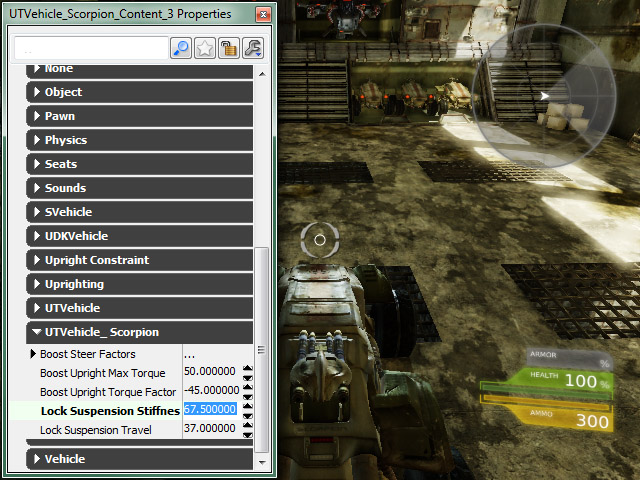
How to change UDK object properties on the fly

So what I didn't know until now is that UDK comes with a Remote Control for use when developing. This is something that will without doubt save me hours as before now it would be a case of tweaking a value, then recompiling then tweaking and recompiling over and over again, which can very quickly remove you will to live.

You can edit the properties of any object that derives from the Actor class using the editactor console command:

 editactor name=UTPawn_0

Also worth noting that if you pass trace as a param then this will display the properties of the object you are aiming directly at

editactor trace


As mentioned in the Gameplay Debugging page, this is ideal for something like fine tuning a vehicle but I guess you could go as far as tuning the lighting or pickup placements.

There are a few other commands available such as EditObject:

The editobject console command makes the properties of a specific object in the game available in the property window
editobject name=GameThirdPersonCamera_0

EditDefault 
The editdefault console command makes the properties of a class default object available, similar to specifying a class with the editobject console command

editdefault UTProj_LinkPlasma
editdefault class=UTProj_LinkPlasma

EditArchetype
The editarchetype console command makes the properties of an archetype available. The archetype to edit is specified by passing the path (Package.Group.Name) to the archetype following the command. Like the editdefault command, this command is also extremely useful for archetypes that are used as templates for objects that are frequently spawned, such as projectiles or units in a real-time strategy game, or for archetypes used as data definitions or content holders.
There's lot of other information in there too from data inspection to code profiling, as always the docs are there you've just got to know what you are looking for at the time.

Monday, August 19, 2013

Jesus saves...but does he back-up?

For me the save game is at the core of what I'm interested in as far as pet projects go, what you've done, who you've met, what colour key you've got in your inventory, that sort of thing. I've seen a couple of threads about it but this one I like as it goes that little bit beyond the basics of getting the file set up it also discusses serialising properties of a given object.

Thursday, May 30, 2013

UDK and Borderlands 2

There's nothing like, a glimpse of the magic or a peek behind the curtain. Day job aside it's nice to see what the basics of UDK can actually lead to. Check out the glitch video where the player breaks out of the map and finds himself stood on a very familiar checker board block, a real insight to the vastness of the level too. 

Passion never goes away


Sunday, December 30, 2012

Faking an AS3.0 document class in AS2.0

Depending on which VM you want to use, some people are still forced to use AS 2.0 for Scaleform development. if so here's scope can be a total nightmare, so why not start off your classes in a nice orderly fashion by faking an AS 3.0 document class.

BIT-101 - Document Class in AS2

Amazing list of tutorials from Tegleg

Tegleg is amazing on the forums ans here's a pretty stunning list of tutorials and bits n pieces

How about this for an exremely comprehensive list of programming resources

I found this list of resources from From Amit Patel over at WillyG's blog. 

My latest quest is to wrap my head around ussing Visual Studio with UDK and try and get nFringe working as not having intelisense in Flash Develop is just driving me insane.


EDIT: Found this in my drafts, thought the links alone were worth publishing this post.

Unreal script and intelisense

The one thing that has driven me insane trying to work with Unreal script hasn't been the syntax, nor the way the script is layered on top an invisible laye of C++ commands running all the time. It's the fact I'm still not comfortable writing code from scratch.

Everything I'm doing is copy and pasted and that's mainly down to not having the features I'm spoilt by having in Actionscript using FlashDevlop.

I've managed to hack my way through to having some sort of syntax colouring but it's just not enough, I need intelisense, I need 'Go to definition' and that's why I've decided to give Unrea Script IDE a shot, it's layered on top of Visual Studio, which as nasty and bloated as I remember it, is the real deal in terms of game development.

One thing I must mention is that not following the installation instructions can, as always, bite you on the arse.
RTM.