Wednesday, September 11, 2013

How to change UDK object properties on the fly

So what I didn't know until now is that UDK comes with a Remote Control for use when developing. This is something that will without doubt save me hours as before now it would be a case of tweaking a value, then recompiling then tweaking and recompiling over and over again, which can very quickly remove you will to live.

You can edit the properties of any object that derives from the Actor class using the editactor console command:

 editactor name=UTPawn_0

Also worth noting that if you pass trace as a param then this will display the properties of the object you are aiming directly at

editactor trace
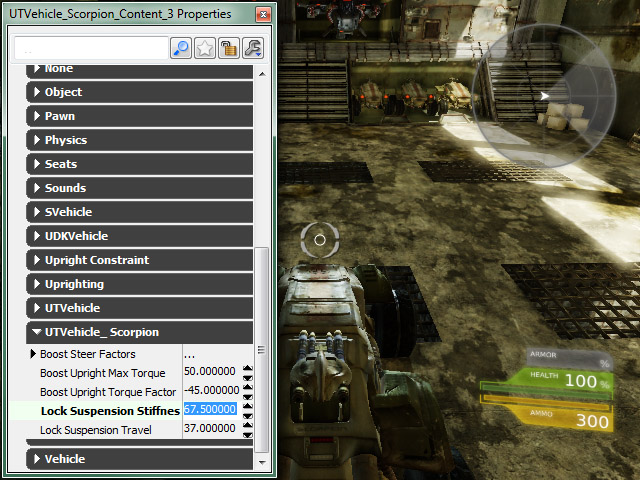


As mentioned in the Gameplay Debugging page, this is ideal for something like fine tuning a vehicle but I guess you could go as far as tuning the lighting or pickup placements.

There are a few other commands available such as EditObject:

The editobject console command makes the properties of a specific object in the game available in the property window
editobject name=GameThirdPersonCamera_0

EditDefault 
The editdefault console command makes the properties of a class default object available, similar to specifying a class with the editobject console command

editdefault UTProj_LinkPlasma
editdefault class=UTProj_LinkPlasma

EditArchetype
The editarchetype console command makes the properties of an archetype available. The archetype to edit is specified by passing the path (Package.Group.Name) to the archetype following the command. Like the editdefault command, this command is also extremely useful for archetypes that are used as templates for objects that are frequently spawned, such as projectiles or units in a real-time strategy game, or for archetypes used as data definitions or content holders.
There's lot of other information in there too from data inspection to code profiling, as always the docs are there you've just got to know what you are looking for at the time.

Monday, August 19, 2013

Jesus saves...but does he back-up?

For me the save game is at the core of what I'm interested in as far as pet projects go, what you've done, who you've met, what colour key you've got in your inventory, that sort of thing. I've seen a couple of threads about it but this one I like as it goes that little bit beyond the basics of getting the file set up it also discusses serialising properties of a given object.

Thursday, May 30, 2013

UDK and Borderlands 2

There's nothing like, a glimpse of the magic or a peek behind the curtain. Day job aside it's nice to see what the basics of UDK can actually lead to. Check out the glitch video where the player breaks out of the map and finds himself stood on a very familiar checker board block, a real insight to the vastness of the level too. 

Passion never goes away


Sunday, December 30, 2012

Faking an AS3.0 document class in AS2.0

Depending on which VM you want to use, some people are still forced to use AS 2.0 for Scaleform development. if so here's scope can be a total nightmare, so why not start off your classes in a nice orderly fashion by faking an AS 3.0 document class.

BIT-101 - Document Class in AS2

Amazing list of tutorials from Tegleg

Tegleg is amazing on the forums ans here's a pretty stunning list of tutorials and bits n pieces

How about this for an exremely comprehensive list of programming resources

I found this list of resources from From Amit Patel over at WillyG's blog. 

My latest quest is to wrap my head around ussing Visual Studio with UDK and try and get nFringe working as not having intelisense in Flash Develop is just driving me insane.


EDIT: Found this in my drafts, thought the links alone were worth publishing this post.

Unreal script and intelisense

The one thing that has driven me insane trying to work with Unreal script hasn't been the syntax, nor the way the script is layered on top an invisible laye of C++ commands running all the time. It's the fact I'm still not comfortable writing code from scratch.

Everything I'm doing is copy and pasted and that's mainly down to not having the features I'm spoilt by having in Actionscript using FlashDevlop.

I've managed to hack my way through to having some sort of syntax colouring but it's just not enough, I need intelisense, I need 'Go to definition' and that's why I've decided to give Unrea Script IDE a shot, it's layered on top of Visual Studio, which as nasty and bloated as I remember it, is the real deal in terms of game development.

One thing I must mention is that not following the installation instructions can, as always, bite you on the arse.
RTM.


Saturday, April 14, 2012

How to get UnrealScript Syntax in FlashDevelop


I've copied the as2.xml and used the syntax highlighting xml I grabbed from from a link on the UDK forums

UnrealScript.xml save it here:

C:\Users\<USERNAME>\AppData\Local\FlashDevelop\Settings\Languages\UnrealScript.xml


Then Edit the C:\Program Files\FlashDevelop\Settings\MainMenu.xml

Add this:
<button label="&amp;UnrealScript" click="ChangeSyntax" tag="UnrealScript" flags="Enable:IsEditable+Check:IsEditable|IsActiveSyntax" />

Underneath:
<button label="Label.Text" click="ChangeSyntax" tag="text" flags="Enable:IsEditable+Check:IsEditable|IsActiveSyntax" />


Then in  C:\Program Files\FlashDevelop\Settings\ScintillaNET.xml

Add:
<include file="$(BaseDir)\Settings\Languages\UnrealScript.xml" />

This should now give you and option to use 'UnrealScript' in the syntax dropdown.

I've created an empty Haxe project and saved it inside C:\UDK\UDK-2012-02


One of the main features I can't stand in visual studio and notepad++ is having to maintain my project file, in FlashDevelop the project shows what's actually on disk and for me that's a huge time saver.

In my opinion Flashdevelop is simply the best code editing tool I've used. It's customisable, simple, and easy to use. features like duplicate line, wrapping searches and project /outline panels are worth their weight in gold when it comes to spending less time fighting your IDE and more time coding.


Friday, April 13, 2012

Magically disappearing assets in UDK

Last weekend I started adding my kids pictures into a UDK as we have plans to make a simple game, collecting items and battling trolls usual sort of stuff. I downloaded the latest beta for Adobe Photoshop 6 draw a path around each character, made it into an alpha channel and saved it out as a tga 32bit to keep the alpha.

I've not really played with alphas and transparencies in UDK but my idea was to create a simple plane, stick the texture onto the plane and that'll do me. Although it was a bit more trial and error than i had imagined I finally got there (see pic)

For the texture I used compression for TC_OnBitAlpha and for the material I plugged rgb into diffuse, alpha into Opacity then set the Material / Blend Mode to BLEND_Alpha_Composite. This seemed to work fine until I noticed the translucency in the sea material was cutting through the 'prince' material, so back into the material for a bit more tinkering and Misc / Enable Separate Translucency seemed to do the trick.

So, everything seemed to be going well, I imported a couple more textures, created materials and left it for lunch. When I came back I reopened my UDK level to find all the newer textures had gone.  

I tried and retried and managed to replicate it every time, I even imported static meshes but everytime I closed and reopened my level they were gone.

Being the dog with a bone type, I added a new level saved it various places, I eventually reinstalled Feb edition and then March just to be sure and every single time I got the same results.

I took it to the forum and checked everything anyone suggested to be sure, then I realised it had something to do with saving the current level verses saving the package.

I separated my textures and materials into their own package and it saved and reopened fine. Pretty much just as I did JetFire left me this gem

"Looks like if I import a texture and don't use it, it gets lost? < this, if you're embedding assets into your level file, rather than a separate .upk- If not used in the scene they'll get wiped. So, either use them, or put your stuff into separate upk's which don't have this feature."
So there you go, use or you lose.

I'm going to have a textures_materials package from now on.